 INR
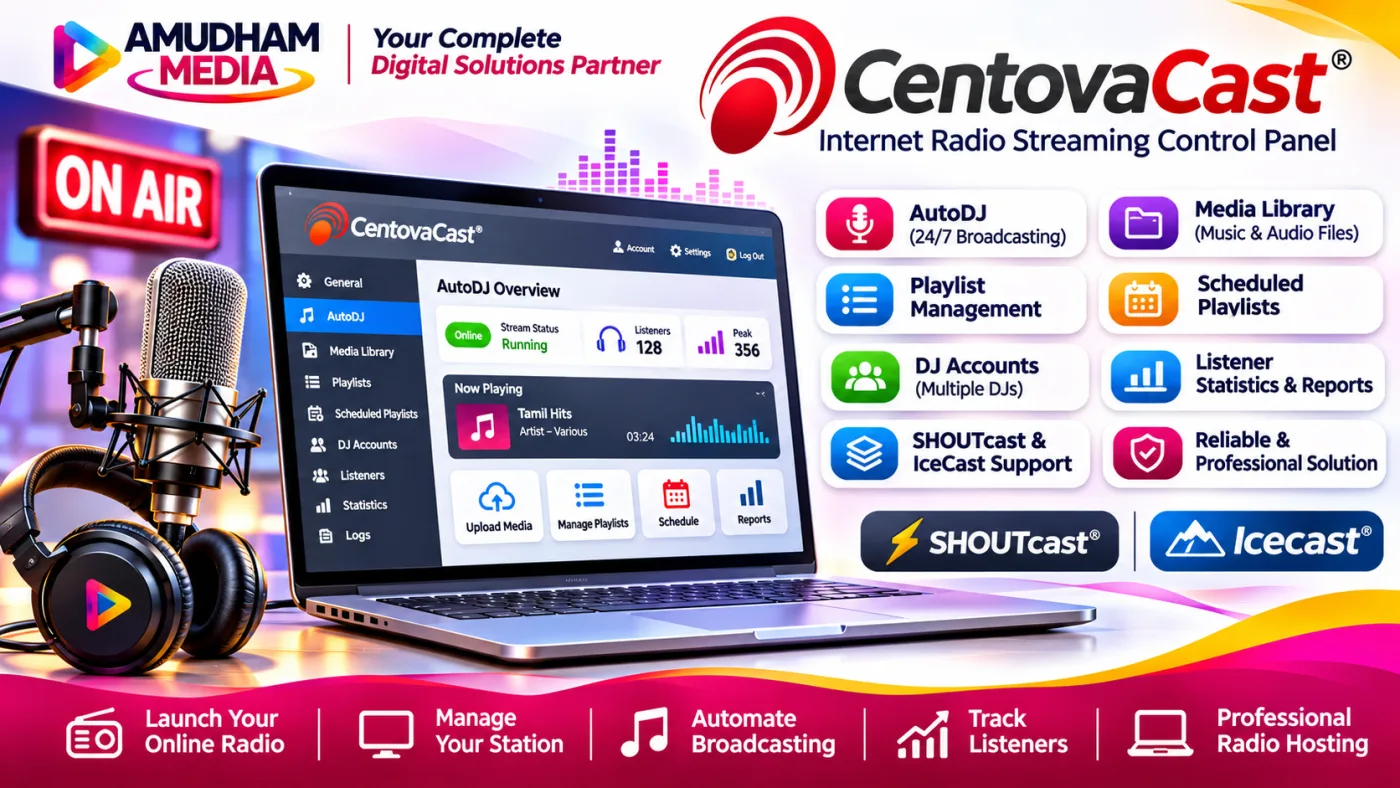
Are you planning to launch your own online radio station or manage a professional radio broadcasting business? Centova Cast is a powerful Internet Radio Streaming Automation and Management Control Panel designed to simplify radio station operations.
Centova Cast provides broadcasters and radio hosting providers with tools to manage streaming servers, automate music playback, organize playlists, monitor listeners and access detailed broadcasting statistics.
Whether you operate a single online radio station or manage multiple radio hosting accounts, Centova Cast offers a centralized platform for managing your internet radio services.
🌐 What Is Centova Cast?
Centova Cast is a web-based radio streaming management platform developed by Centova Technologies Inc.
It is designed for two main types of users:
📻 Radio Broadcasters: Manage and monitor their own internet radio stations.
🖥️ Radio Hosting Providers: Manage multiple streaming accounts and operate a radio hosting business.
It supports internet radio streaming environments using SHOUTcast and IceCast technologies.
⭐ Key Features of Centova Cast
🎵 1. AutoDJ – Automated Radio Broadcasting
AutoDJ is one of the most important features of Centova Cast.
It allows radio stations to broadcast music automatically without requiring a computer to remain connected as a live broadcasting source.
With AutoDJ, broadcasters can:
Upload music files to the server.
Organize audio tracks in a media library.
Create multiple playlists.
Schedule music and programmes.
Automate continuous broadcasting.
Switch between live broadcasting and AutoDJ.
This makes it possible to maintain an automated radio broadcasting schedule.
🎧 2. Advanced Media Library
Centova Cast includes a web-based media library for managing radio station audio content.
Broadcasters can browse and organize tracks using information such as:
Artist
Album
Track title
Genre
The drag-and-drop interface makes it easier to add tracks to playlists and organize broadcasting schedules.
📅 3. Advanced Playlist Scheduling
Centova Cast provides different playlist types to control how and when audio content is played.
General Rotation Playlists
Automatically rotate music tracks according to playlist settings and weighting.
Scheduled Playlists
Play selected content at specific dates and times. Useful for pre-recorded programmes, countdowns and scheduled shows.
Interval Playlists
Play jingles, station identification and advertisements at recurring intervals.
Immediate Playlists
Play selected content immediately after the currently playing track finishes.
These scheduling options help broadcasters manage their station programming more efficiently.
📡 4. SHOUTcast & IceCast Stream Management
Centova Cast provides management tools for supported streaming servers.
Broadcasters can access their stream settings and manage their broadcasting environment through a web-based control panel.
Common management operations include:
Start and stop streaming servers.
Manage stream configuration.
Monitor server status.
Access streaming information.
Configure AutoDJ settings.
Manage broadcasting accounts.
📊 5. Advanced Listener Statistics & Reports
Understanding your audience is important for growing an online radio station.
Centova Cast provides detailed streaming statistics and reporting tools.
Available information includes:
Current listeners
Listener sessions
Average listening duration
Listener trends
Listener countries
Data transfer usage
Track performance
Historical statistics
Broadcasting activity
These reports help radio station owners understand audience activity and monitor station performance.
🎙️ 6. Multiple DJ Account Management
Centova Cast supports DJ account management with configurable permissions.
Radio station administrators can provide individual access to presenters and broadcasters.
Depending on assigned permissions, DJs can access specific station management functions without requiring the main administrator credentials.
This is useful for radio stations operating with multiple presenters and programmes.
🌍 7. Station Homepage & Embeddable Widgets
Centova Cast can generate a station start page with useful information for listeners.
Depending on the configuration, available features include:
Current stream status
Now Playing information
Recently played tracks
Song request functionality
Station tune-in links
Listener location information
It also provides embeddable widgets that can be integrated into an existing radio website.
🔔 8. Reliability Monitoring
Maintaining continuous radio broadcasting is essential.
Centova Cast includes stream monitoring functionality designed to detect unexpected streaming server failures and automatically restart affected services.
It can also notify administrators and clients about detected outages.
📈 9. Royalty Reports
Centova Cast provides downloadable song performance reports that can help broadcasters prepare music licensing and royalty information.
Reports can include details about played tracks, performance dates, times and audience information.
These reports can support the reporting process required by applicable music licensing organizations.
🏢 10. Centralized Administration & Reseller Management
For radio hosting providers, Centova Cast offers centralized administration features.
Administrators can manage client accounts, review resource usage and configure account limits.
Reseller functionality allows hosting providers to offer reseller accounts with their own account management interface and configurable resource limits.
This makes Centova Cast useful for businesses providing internet radio hosting services.
⚙️ How Does Centova Cast Work?
A typical internet radio broadcasting setup works through the following process:
Step 1 – Radio Hosting Server
Obtain a compatible streaming hosting account with the required Centova Cast installation and access.
Step 2 – Configure Your Radio Station
Set up your station name, stream configuration and broadcasting details.
Step 3 – Upload Audio Files
Upload your music and audio content into the media library.
Step 4 – Create Playlists
Organize music, jingles, advertisements and scheduled programmes.
Step 5 – Enable AutoDJ
Configure AutoDJ to automate your broadcasting schedule.
Step 6 – Connect Live DJ Software
Connect compatible broadcasting software to your streaming server for live programmes.
Step 7 – Launch Your Radio Station
Integrate your streaming URL with your website, mobile application and radio player.
💻 What Do You Need to Run Centova Cast?
Before using Centova Cast, you need a compatible server environment and a valid Centova Cast licence.
Typical requirements include:
Compatible Linux server environment
Supported streaming server software
Centova Cast software and licence
Domain or server hostname
Internet connectivity
Appropriate server resources
SSL configuration where required
Always check the current official system requirements before purchasing or installing the software.
📻 Centova Cast for Radio Hosting Businesses
Centova Cast is not limited to individual radio stations.
It also provides management capabilities for businesses that want to offer radio streaming services to multiple customers.
Radio hosting providers can use its administration and reseller features to:
Create and manage customer accounts.
Configure individual streaming resources.
Monitor server usage.
Manage reseller accounts.
Review customer streaming statistics.
Centralize radio hosting operations.
This makes it a useful platform for professional internet radio hosting businesses.
🌐 Connect Centova Cast with Your Radio Website & Android App
A professional radio station should offer listeners convenient access across multiple platforms.
Centova Cast can be integrated into a broader digital broadcasting setup.
Radio Website
Integrate a live streaming player, Now Playing information, recently played tracks and station widgets.
Android Radio Application
Connect your Android application to your radio streaming URL and provide listeners with mobile access.
Social Media
Share your station links and promotional content across Facebook, Instagram and other platforms.
Your streaming server becomes the central audio source for your website, application and compatible media players.
⭐ Why Choose Professional Centova Cast Radio Hosting?
A properly configured radio hosting environment helps broadcasters manage their stations efficiently.
Important considerations when choosing a hosting provider include:
Reliable server infrastructure
Appropriate listener capacity
Suitable bandwidth allocation
AutoDJ availability
Supported audio streaming formats
Technical support
Regular server maintenance
Secure streaming configuration
Always select a hosting plan based on your station's expected audience and technical requirements.
🚀 Start Your Online Radio Journey with AMUDHAM MEDIA
At AMUDHAM MEDIA, we provide digital media and online broadcasting solutions for individuals, businesses, radio stations and media organizations.
Our radio and digital services include:
🎙️ Centova Cast Radio Hosting Solutions
📡 SHOUTcast & IceCast Streaming Setup
🎵 AutoDJ Configuration
🎧 Radio Website Development
📱 Android Radio Application Development
🌐 Radio Player Integration
🖥️ Web Hosting & Server Solutions
🎨 Radio Branding & Graphic Design
🛠️ Technical Support
Whether you are launching your first online radio station or expanding your radio hosting business, we can help you build a complete digital broadcasting platform.
❤️ Conclusion
Centova Cast brings radio streaming management, AutoDJ automation, media library management, playlist scheduling, listener statistics and administration tools together in one web-based platform.
For individual broadcasters, it simplifies daily radio station management. For hosting providers, it offers tools to manage multiple streaming accounts and reseller operations.
Combine Centova Cast with a professional radio website and Android application to create a complete online radio experience.
AMUDHAM MEDIA – All Digital Solutions in One Place.
Start your online radio project with professional digital media solutions.