 INR
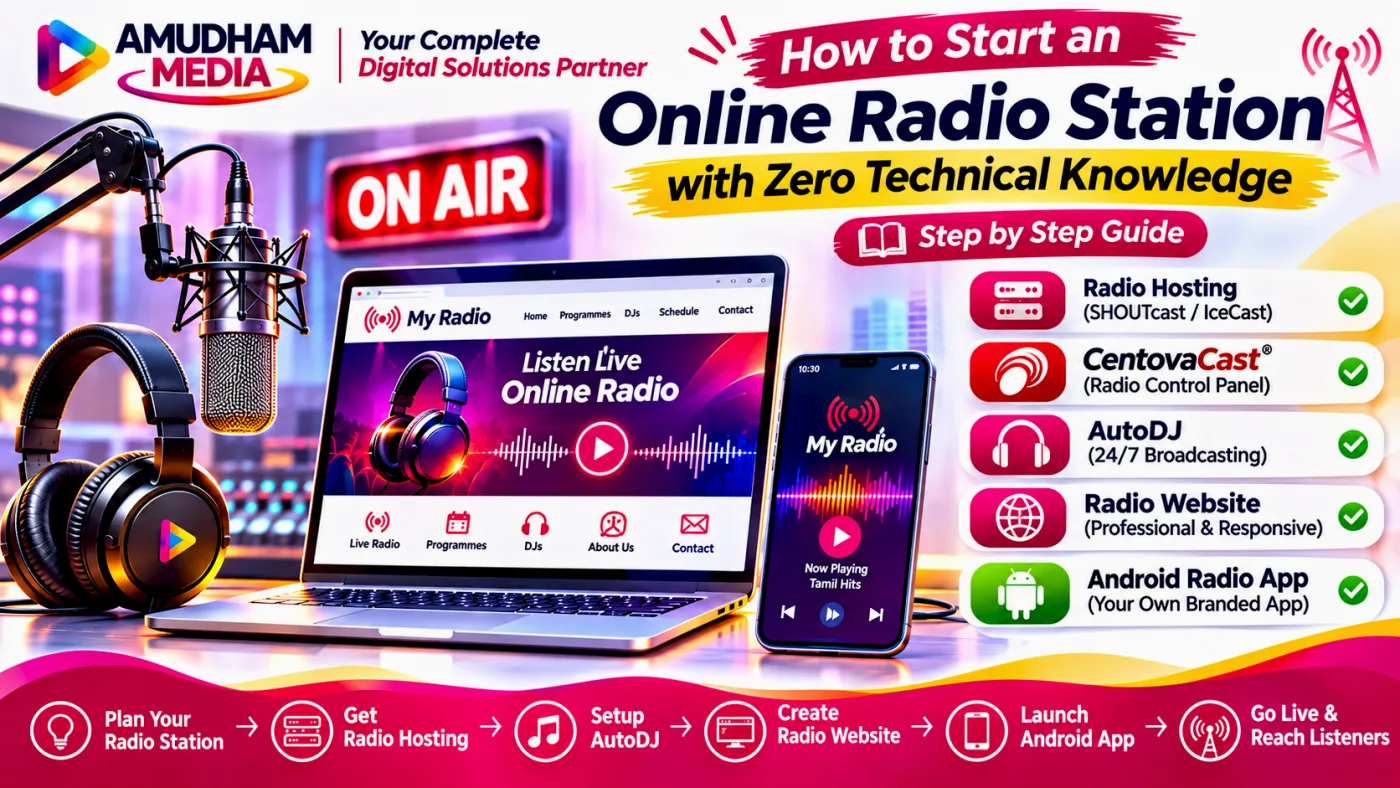
Have you ever dreamed of owning your own radio station? Do you want to broadcast Tamil songs, devotional programmes, live shows or entertainment to listeners around the world?
The good news is that you don't need to be a programmer or a technical expert to start an online radio station in 2026.
With modern radio hosting services, AutoDJ automation, ready-to-use control panels and professional technical support, almost anyone can launch an internet radio station.
In this beginner-friendly guide, AMUDHAM MEDIA explains how to start your own online radio station step by step, even if you have zero technical knowledge.
🌟 1. Decide What Type of Radio Station You Want
Before starting, think about what kind of radio station you want to create.
Here are some popular ideas:
🎵 Tamil Music Radio
🙏 Devotional Radio
🎙️ Live Talk Radio
📰 News & Information Radio
🎶 Entertainment Radio
🌍 International Music Radio
🎧 Community Radio
🎼 Cultural Radio
Choose a station name, target audience and broadcasting language.
You can start with a simple music radio station and expand your programmes as your audience grows.
🌐 2. Get Professional Radio Hosting
Radio hosting is the foundation of your online radio station.
Think of radio hosting as a service that keeps your audio broadcasting available on the internet.
You don't need to purchase an expensive broadcasting server or manage complicated server configurations yourself if you choose a managed radio hosting provider.
A professional radio hosting plan may include:
📡 SHOUTcast or IceCast streaming
🎵 AutoDJ functionality
🎛️ Radio control panel
📊 Listener statistics
🎧 Audio streaming URL
📁 Media file management
🛠️ Technical support
Choose a hosting plan based on your expected listener capacity, audio quality and bandwidth requirements.
🎛️ 3. Understand AutoDJ – Your 24/7 Radio Assistant
AutoDJ is one of the easiest ways to operate an online radio station.
Imagine uploading your favourite songs, arranging them into playlists and letting the system play them automatically.
That's what AutoDJ does!
With AutoDJ, you can:
🎵 Upload MP3 music files.
📂 Organize songs into categories.
📋 Create music playlists.
📅 Schedule programmes.
📢 Add station jingles and advertisements.
🔄 Automatically play music 24/7.
You don't need to sit in front of your computer all day.
Once properly configured, AutoDJ can continue broadcasting according to your playlist and scheduling settings.
🖥️ 4. Choose a Radio Control Panel
A radio control panel makes station management easier.
One popular solution is Centova Cast, which provides a web-based interface for managing internet radio broadcasting.
You can manage many important radio operations through a browser.
Features include:
🎵 AutoDJ Management
📁 Media Library
📋 Playlist Management
📅 Scheduled Broadcasting
🎙️ DJ Account Management
📊 Listener Statistics
🔊 Stream Management
Instead of manually managing every broadcasting task, you can use the control panel to organize your radio station.
🎙️ 5. Start Broadcasting Without a Professional Studio
You don't need an expensive radio studio to begin.
If you want to present live programmes, you can start with basic equipment.
Recommended equipment:
🎤 USB Microphone
🎧 Headphones
💻 Laptop or Desktop Computer
🌐 Stable Internet Connection
🎚️ Audio Mixer (optional)
You can also use broadcasting software such as BUTT or Mixxx to connect your live audio to your radio streaming server.
If you only want automated music broadcasting, AutoDJ may be sufficient to get started.
🌐 6. Create Your Own Radio Website
A professional radio website gives your station its own identity on the internet.
Your listeners can visit your website and listen to your station from anywhere.
A good radio website should include:
🏠 Professional Homepage
▶️ Live Radio Player
🎵 Now Playing Information
📅 Programme Schedule
🎙️ DJ Profiles
📻 About the Radio Station
📱 Mobile-Friendly Design
📞 Contact Information
🔗 Social Media Links
Your website can also include a direct streaming player connected to your SHOUTcast or IceCast stream.
You don't need to learn coding if you work with a professional website development service.
📱 7. Launch Your Own Android Radio App
Want your listeners to access your radio station directly from their smartphones?
A dedicated Android radio application makes this possible.
Your branded radio app can include:
📻 Live Radio Streaming
▶️ Play and Pause Controls
🎵 Now Playing Information
🔊 Background Audio Playback
📱 Custom Radio Logo
📢 Push Notifications
📲 WhatsApp Contact
🔗 Social Media Sharing
Your listeners can install the application and listen to your station without having to open a browser every time.
A professional Android application also helps establish your radio station's identity.
🔗 8. Connect Your Radio Hosting, Website and App
This is where everything comes together.
You can use one radio streaming source for multiple listening platforms.
Here's how it works:
🎵 Upload music to your AutoDJ.
📡 Your radio hosting server broadcasts the audio.
🌐 Connect the streaming URL to your website player.
📱 Connect the same stream to your Android application.
🌍 Listeners can tune in from different devices.
Your radio station can now reach audiences through your website, Android app and compatible streaming players.
📢 9. Promote Your Online Radio Station
After setting up your station, it's time to attract listeners.
Try these promotional methods:
📱 Create a Facebook page.
📸 Share updates on Instagram.
🎬 Publish promotional videos on YouTube.
💬 Share your radio link through WhatsApp.
🎙️ Create attractive radio jingles.
📢 Announce special programmes.
🌍 Build a community around your station.
Consistent broadcasting and interesting content can help build a loyal audience.
⚖️ 10. Understand Music Copyright Requirements
Before broadcasting commercial music, make sure you have the appropriate permissions and licences.
Copyright and music licensing requirements depend on the country, type of music and broadcasting arrangement.
Remember, purchasing a song or having a personal music subscription does not automatically give you permission to broadcast it publicly.
Check the applicable licensing requirements before launching your station.
💰 11. How Much Does It Cost to Start an Online Radio Station?
The cost depends on the services and features you need.
Your budget may include:
🌐 Radio Hosting Subscription
🎵 AutoDJ Service
🖥️ Website Development
📱 Android App Development
🔗 Domain Registration
🎨 Logo and Branding
🎙️ Broadcasting Equipment
You can begin with a basic managed radio hosting plan and add a professional website and Android application as your project grows.
Ask your hosting provider for a complete quotation covering setup, recurring charges, listener capacity and support.
⭐ 12. Why Choose AMUDHAM MEDIA?
Starting an online radio station can feel complicated when you have no technical experience.
That's why professional setup and support can make a difference.
AMUDHAM MEDIA provides digital media and broadcasting solutions to help individuals, businesses and organizations establish their own online radio stations.
Our services include:
📡 SHOUTcast Radio Hosting
❄️ IceCast Streaming Solutions
🎛️ Centova Cast Control Panel
🎵 AutoDJ Setup & Configuration
🌐 Professional Radio Website Development
📱 Android Radio App Development
🎨 Radio Logo & Branding
▶️ Custom Radio Player Integration
🖥️ Web Hosting & Server Solutions
🛠️ Technical Assistance
From initial setup to website and mobile app integration, we can help you build a complete online radio broadcasting platform.
🚀 Conclusion – Your Radio Station Starts Here!
You don't need to be a programmer, server administrator or broadcasting expert to start your own online radio station.
With managed radio hosting, AutoDJ automation, a user-friendly control panel, a professional website and an Android application, you can turn your radio idea into a real online broadcasting platform.
Start with a simple concept, choose the right services and gradually grow your audience.
Your dream radio station could be just a few steps away!
❤️ Ready to Start Your Own Online Radio Station?
Let AMUDHAM MEDIA help you build your own digital radio platform.
Contact us to explore radio hosting, AutoDJ, website development and Android radio app solutions.
AMUDHAM MEDIA – All Digital Solutions in One Place.